
Do you know what your Google Ads campaign is actually trying to achieve?
Most people think Google Ads is just about “running ads.” In reality, it is more like giving directions to a very eager assistant who will only follow the goal you set. If your campaign objective is to get sales, it hunts for buyers. If you tell it to get attention, it goes looking for eyeballs. Same system, very different behaviour.
That is where campaign objectives inside Google Ads come in. They are not just settings. They are the instructions that shape who sees your ads, how they see them, and what Google considers a win.
Some objectives chase immediate action. Some warm people up slowly. Some just get your brand into the room before anyone is ready to talk numbers.
Let’s unpack what each Google Ads campaign objective actually does, without the fluff getting in the way.
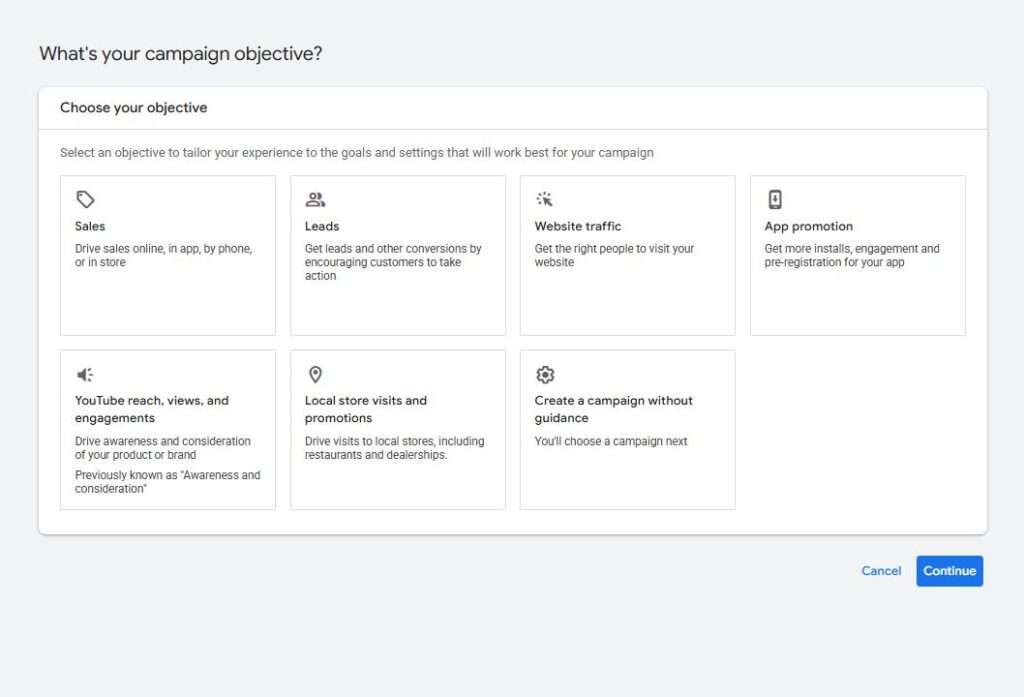
1. Sales
This objective tells Google to focus on driving purchases, bookings, or any direct revenue action. Best For:
- Ecommerce stores
- Online bookings
- Subscription businesses
- Tourism operators with direct payment flows
Pros: This objective is built around results you can measure in money terms. Once tracking is set up properly, Google can optimise towards real transactions instead of guesswork. Over time, it tends to get sharper as it learns what a paying customer looks like.
Cons: The system needs solid conversion data to work properly. If tracking is weak or inconsistent, performance can feel unstable. It also tends to ignore people who are still in research mode, which means you might miss early-stage interest.
2. Leads Objective
This objective focuses on getting people to enquire, call, or submit a form. Best For:
- Service businesses
- Consultants
- Travel agents
- Medical and professional practices
- Home services
Pros: This works well when your sales happen through conversations instead of instant checkout. It brings in people who are already interested enough to make contact, which often makes it easier to start real business discussions.
Cons: Not every enquiry will be a good one. Some leads will be strong, others will go nowhere, and it can take time to filter quality. The landing page and follow-up process end up playing a big role in success.
3. Website Traffic
This objective prioritises getting users to click through to your website. Best For:
- New websites
- Content-driven brands
- Awareness campaigns
- Remarketing audience building
Pros: It is useful when you need quick visibility or want to start building audiences. You get people onto your site fast, which can help kickstart remarketing or content exposure.
Pros: Clicks do not always mean interest. Many users arrive without strong intent, which can make results feel a bit hollow if traffic is the only goal. It often works better as part of a wider strategy rather than a standalone focus.
4. App Promotion
This objective focuses on getting app installs and encouraging in-app engagement. Best For:
- Mobile apps
- SaaS platforms
- Gaming apps
Pros: It gives access to a wide network of placements and can automate a lot of optimisation. Google can adjust targeting based on install behaviour or in-app actions, which helps scale reach.
Pros: An install is only the beginning. If the app experience is weak, users drop off quickly. It also offers less control over exactly where ads appear, which can feel a bit hands-off.
5. Video Reach, Views and Engagement
This objective uses video ads to build awareness, views, and engagement. Best For:
- Brand awareness campaigns
- Product launches
- Tourism storytelling
- Long-term brand building
Pros: Video gives you space to tell a story and reach large audiences at relatively low cost compared to search. It is especially strong when paired with later remarketing efforts.
Pros: The link between spend and direct sales is not always obvious. It usually works over time rather than delivering instant returns, and it depends heavily on having strong video content.
6. Local Store Visits
This objective encourages people nearby to visit a physical location. Best For:
- Retail stores
- Restaurants
- Car dealerships
- Local service businesses
Pros: It is effective for turning online attention into real-world visits. It helps bridge the gap between someone searching and someone actually walking through the door.
Pros: Measuring success is not always precise. It also relies heavily on accurate location data and is only useful if you have a physical presence customers can visit.
7. Create Without Guidance
This option lets you build campaigns without Google’s recommended structure. Best For:
- Experienced advertisers
- Agencies
- Advanced strategies
Pros: It gives full control over setup and structure. You can design campaigns exactly how you want without being guided into Google’s default approach.
Cons: It is easy to get things wrong if you are not experienced. Without guardrails, mistakes in setup or targeting can quietly waste budget before you notice.
Which Campaign Objective Should You Choose?
It depends on what you actually want the system to do for your business.
Sales works when you want transactions. Leads work when you want conversations. Traffic works when you want attention. Video works when you want awareness. Local works when you want physical visits.
Each one trains Google Ads to behave differently, so the real decision is less about “which is best” and more about “what outcome matters right now.”
Get it right and everything starts pointing in the same direction. Get it wrong and you can end up with activity that looks busy but does not really move the needle.
Think of it less like picking a campaign type and more like deciding what game you want the system to play for you.